B2B ordering portal: what it must do before your reps stop retyping emails
A portal only empties the sales inbox once it closes a whole order: this buyer’s price, a reorder from history, a pasted SKU list, the credit limit, real availability dates, approval on the buyer side, a PO reference and an honest status when the ERP goes quiet. Each requirement with the condition it fails without, plus an acceptance test to run on a demo.
A B2B ordering portal takes orders out of your inbox only once it can close an entire order without anyone on your side touching it. That means eight capabilities at the same time: the price this specific account is entitled to, a reorder built from their history, a pasted list of part numbers, a visible credit limit and open invoices, real availability with a date, an approval step inside the buyer’s own organisation, a sales document created in the ERP, and an honest message when the ERP stops answering. Below is each one with the condition it fails without.
Key takeaways
- A portal removes retyping only when it can close an entire order. Miss one of the eight capabilities and the buyer emails the whole order instead, because nobody splits one order across two channels.
- Before choosing features, sort one month of your sales inbox into four buckets: identical reorder, reorder with changes, question asked before ordering, and exception. A portal earns its keep on the first two.
- The most commonly skipped requirement is buyer-side roles: who orders, who approves, and who gets to see prices and the credit limit. It surfaces in month two, when a customer asks for a second login.
- With a dozen regular accounts placing a few dozen orders a month, email wins. It handles exceptions faster, costs nothing and needs no maintenance. Run that arithmetic before the project, not after.
Eight things a sales rep retypes before lunch
The wholesale day starts in a shared mailbox. One message says „same as last time, eight cases instead of five”. The next carries a spreadsheet built around the buyer’s own part numbers. A third asks whether an item is in stock, a fourth asks for a price on a bigger quantity, a fifth asks whether last month’s invoice cleared. Your rep opens the ERP, finds the account, retypes the lines, checks the contract price, calls finance about a credit limit and writes back. Every one of those steps is a separate place to get a unit or a code wrong.
The bottleneck is not the typing. It is that all this information lives only on your side.
Which leads to an awkward conclusion when you are scoping a build: a portal that removes six of the eight jobs removes none of them in practice. A buyer will not split one order between a portal and an email, because ordering is a single task to them. If the portal still forces a message about two uncertain lines, they will send a message with all twenty lines. That is our read on how this work behaves, and the cheapest way to check it on your own numbers is in the next section.
Count your inbox before you count features
We are not going to hand you a percentage of orders a portal will absorb. We have no published measurement of our own, and a figure lifted from someone else’s industry report describes their customers rather than yours. What follows is a method instead of a result. It takes one afternoon and produces a number your board will accept.
Take one month out of the shared sales mailbox, not a year, because nobody finishes a year. Sort the messages into four buckets:
- Bucket 1, identical reorder: the same items in the same quantities as before.
- Bucket 2, reorder with changes: the same basket with a different quantity, one line dropped, or a different delivery date.
- Bucket 3, a question before the order: availability, price, lead time, or whether an invoice has been settled.
- Bucket 4, exception: a new product, an unusual term, a credit note, a complaint, a negotiation.
Give every bucket two figures: how many messages it holds, and how many minutes one message takes from opening it to a finished document. Do not estimate the minutes from memory, because memory flatters or punishes depending on the day. Time five messages per bucket with a stopwatch and take the median. Multiply, add up, and look at the hours sitting in buckets one and two, because that is the work a portal genuinely absorbs. Bucket three shrinks. Bucket four stays with a human, and should.
That single number is both the business case and the budget ceiling.
Price this buyer actually pays, visible before the order
A portal that shows list prices and adds „prices to be confirmed by your account manager” is a catalogue with a contact form attached. No professional buyer commits to a price they cannot see, so they email. The entry condition is a price resolved for the logged-in account at the moment the line is displayed, with volume breaks shown next to it: „from 50 units, 38.40 net”. That one element also works in your favour, because buyers raise quantities to reach a break, which a rep on the phone rarely suggests.
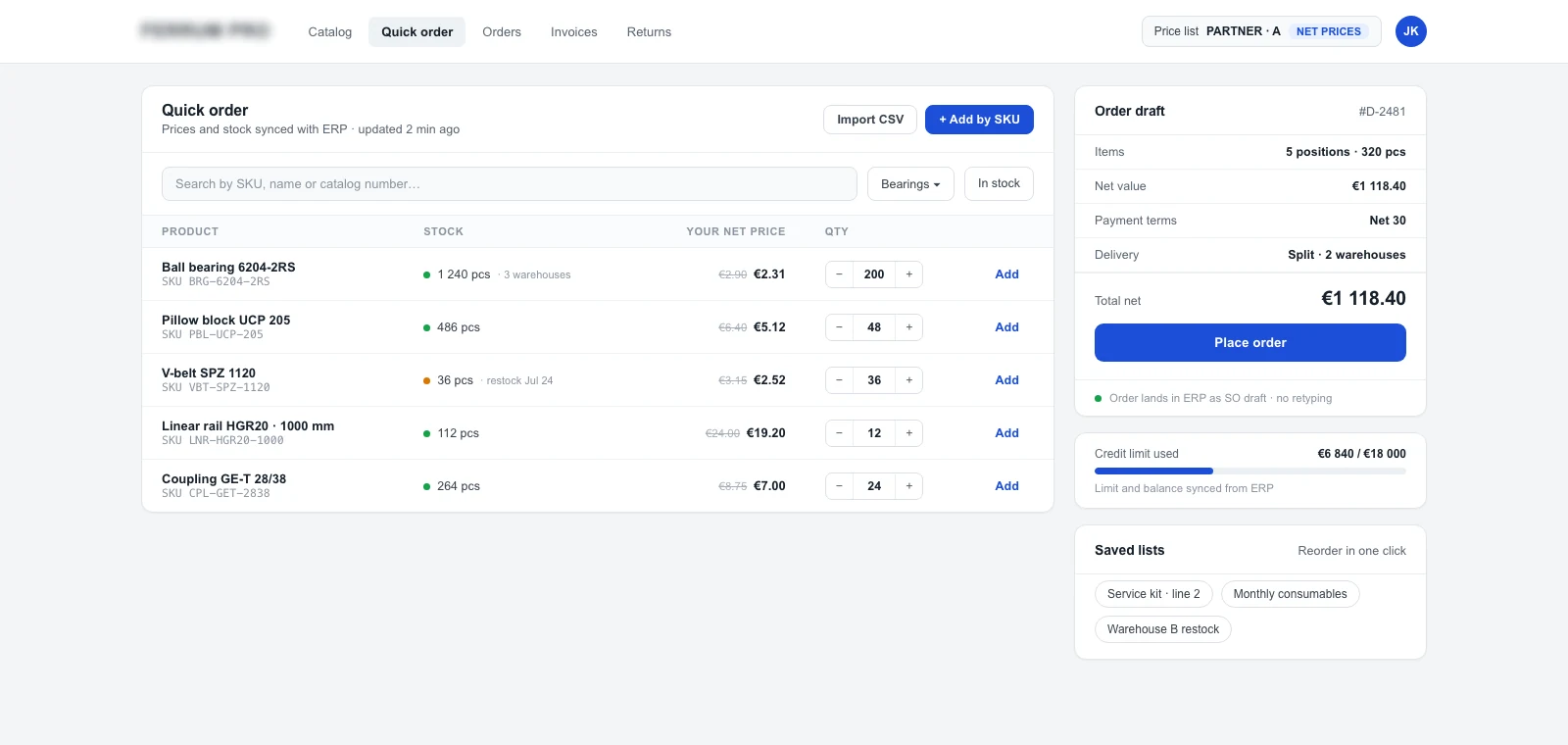
The second condition is technical and easy to miss on a demo. The portal has to price the whole basket, not only the individual line, because a break calculated on order value moves every time a quantity changes. We are not repeating the resolution hierarchy here, it has its own article: B2B pricing models and framework agreements, and the module itself is B2B pricing and quotes.
One check settles this: log in as two different accounts and compare the same line.
Reordering carries half the workload on its own
If buckets one and two came out largest, and in wholesale they usually do, order history matters more than search and faceted filters. The buyer signs in, sees last month’s order, hits reorder, adjusts two quantities and submits. Reorders must stay editable before submission, because a repeat is rarely identical. Add saved lists named in the buyer’s language rather than yours: „front-of-house”, „Leeds branch”, „quarterly top-up”, each tied to a delivery address.
One detail here decides whether the portal survives its first week. An order from last year contains discontinued lines, renumbered codes and changed pack sizes. A portal that quietly drops three lines on reorder produces a short delivery and a phone call. A portal that says „these three lines are gone, two have successors, confirm the swap” closes the job with nobody involved.
Pasted part numbers instead of browsing a catalogue
Professional buyers do not browse. They keep a purchase list in a spreadsheet, frequently written in their own part numbers, and they will not abandon it for your search box. So the portal has to accept that list in the shape it already exists: pasted into a text area with whatever separator the buyer used, uploaded as CSV or XLSX, and matched against a cross-reference between their codes and yours. That cross-reference is the least glamorous part of the build and the one that decides whether a large account signs in at all.
Accepting the file is not enough on its own. Between the paste and the basket there has to be a reconciliation screen that states plainly what matched, what did not, what is unavailable, and where the unit of measure disagrees. Without that screen, pasting manufactures errors that somebody unpicks by hand later, so retyping returns through a different door. The quietest failure is always the unit: the buyer types „10” meaning cases, and the portal adds ten singles.
The reconciliation screen matters more than the import itself.
Credit limit and open invoices, without a call to finance
The „can I release this order” call costs both sides: it occupies a rep, interrupts finance, and adds hours to the buyer’s answer. A portal removes it once it shows four things: the approved credit limit, how much of it is used, open invoices with their due dates, and the consequence for this particular basket. The consequence is the part almost everyone skips. The buyer needs to know before submitting whether the order clears, waits for payment, or goes to their account manager for a decision.
There is an honest caveat to settle before the build rather than after. Showing a balance only helps if the receivables ledger is current. If payments in your business post two days late, the portal will show invoices as overdue that the buyer paid on Friday. They will notice once, mention it to their rep, and stop trusting that whole panel. At that point you have a bookkeeping cadence problem wearing an interface costume, and it gets fixed before launch.
Availability with a date, never a contact form
An „enquire about availability” button is an email reply in disguise. A wholesale buyer needs something they can plan around: goods on Thursday, or a decision to buy elsewhere today. That does not have to be an exact unit count, which plenty of distributors reasonably keep private. A band and a date will do: „in stock”, „up to 8 units”, „ships 21 August”. It does have to be a commitment you keep, because availability shown wrongly once costs more than availability not shown at all.
Treat items you simply do not hold as a separate case. Zero on hand with a confirmed date from your supplier is a lead time rather than an absence, and a portal that displays a bare zero hands that order to email or to a competitor. Add the split-delivery decision to the basket as well: ship what is available now, or hold for a complete consignment. That single option removes two messages from every incomplete order.
Sync cadence and safety buffers belong to a different piece: B2B store with ERP integration.
Who orders and who approves on the buyer’s side
A buying organisation is rarely one person. A stock controller or branch manager raises the order, and an owner, finance manager or procurement lead approves it above some value. A portal that gives one account one login pushes that structure straight back into email: the branch writes to head office, head office writes to you. So you need several users under one account, roles with different visibility, a value threshold that triggers approval, a basket parked for sign-off with a notification, and a record of who approved what.
This requirement almost never appears in a first brief. It surfaces in month two, when a customer asks for an extra login „for Sam in the warehouse”, and you discover that Sam would then see every contract price, the credit limit and the account balance. Delivery addresses need assigning to users for the same reason, so one branch manager cannot order onto another branch by accident. Scope the roles with the customer, not for them.
PO numbers and references their finance team will demand
Where a buyer’s accounts payable team requires their own purchase order number on the invoice, an invoice arriving without it goes into a queries pile and the payment clock starts again. That makes reference capture a portal requirement rather than an accounting detail: a PO number field on the order, validated where the buyer insists on a format, carried through to the delivery note and the invoice, alongside cost centre or contract references where the buyer uses them. Reps collect these fields by hand today, which is exactly the kind of copying a portal is supposed to end.
Ask the three largest accounts what their accounts payable team requires, before anyone designs the checkout.
What the portal sends to the ERP, and what it says when the ERP goes quiet
An order placed in a portal has two different meanings of „received”: accepted by the portal, and registered in the ERP as a sales document. The buyer sees the first, your warehouse works from the second, and between them sits a queue that occasionally stalls. So the status the buyer reads should match the stage the order has genuinely reached, and the ERP document number should travel back to them. That number looks like a triviality and is the only proof a buyer has that their order left the portal and entered your company.
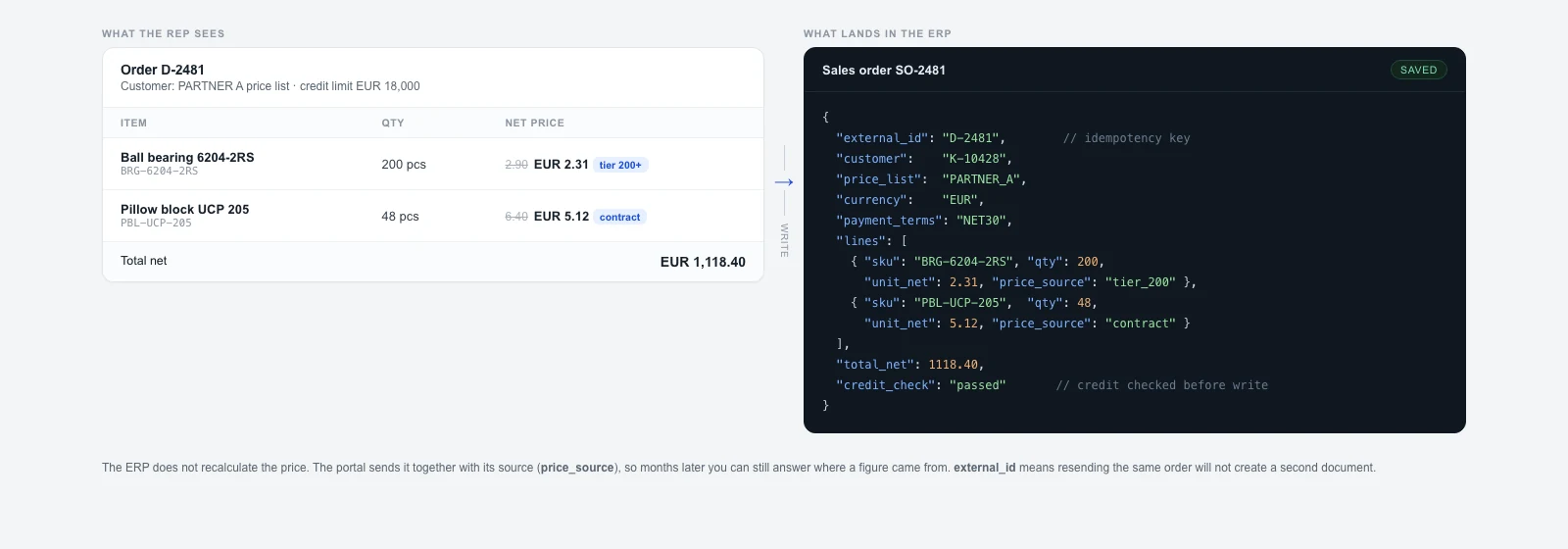
Integration outages will happen, so decide in advance what the buyer sees during one. Three decisions to settle before launch, because they concern the promise you make rather than the code:
- What the portal stops promising without the ERP: a price from the last sync is usually safe, a stock figure from yesterday is not.
- Who hears about it first: the rep before the customer, so there is time to call rather than apologise.
- What the buyer reads: „order received, quantities confirmed within the hour” earns trust, while a false „in fulfilment” burns it.
Everything about queues, retries and idempotency sits in integrating a B2B store with an ERP rather than in the storefront.
Collected in one place, with the entry condition for each capability:
| Capability | Condition it fails without | What the buyer does instead |
|---|---|---|
| Contract price | Resolved per logged-in account and across the whole basket | Emails to ask for a price |
| Reorder from history | Editable, with discontinued lines flagged explicitly | Submits an order that needs a phone call to fix |
| Pasted SKU list | A reconciliation screen: matched, unmatched, units | Attaches the spreadsheet, as always |
| Credit limit and balance | Current receivables plus the consequence for this basket | Calls the rep, who calls finance |
| Availability and date | A band or count with a date, including supplier lead times | Emails, then buys elsewhere while waiting |
| Buyer-side approval | Roles, a value threshold and a sign-off notification | Runs the approval loop in their own mailbox |
| PO and references | Captured on the order, carried to note and invoice | Sends the PO separately, finance chases it |
| Behaviour during an outage | Honest status, and the rep told before the customer | Stops trusting the portal after one incident |
Our assessment of the entry conditions, based on how these processes behave rather than a feature test of named platforms. Read the middle column as questions for a vendor.
Your sales team stays, their queue changes
Nobody here gets replaced. The portal removes line entry, stock checking and the call to finance, and leaves what a portal cannot do: negotiation, exceptions, a new product going into a customer’s range, complaints, and the conversation with an account considering a bigger commitment. In practice, a rep stops working from a list of orders to key in and starts working from a list of accounts that have not ordered this month. Almost nobody maintains that second list today, because there was never anything to build it from.
One thing outside the technology can sink the whole rollout. A rep who suspects that self-service orders will not count towards commission never sends the customer a login link, and a customer without a link never signs up. Settle how portal orders are compensated before launch. Commission design is a commercial decision with a direct technical consequence, because without it adoption stays low and nobody can explain why.
Adoption is delivered by the people who are supposed to send buyers to the portal.
When a portal is the wrong build
With a dozen or so regular accounts placing a few dozen orders a month, email is the better tool, and we say that as a company that builds these portals. Email handles an exception faster than any interface, needs no customer onboarding, costs nothing, and never has to be maintained or upgraded. Portals win on repetition, so if buckets one and two from the counting exercise came out small, the arithmetic fails and the honest move is to revisit it next year.
Three situations where we advise against the project regardless of volume:
- Every order is negotiated: in project-based selling the portal covers the end of the process, while the copying sits at the start of it.
- One large customer orders via EDI: that is a job for an integration in their standard, not for a portal with a login screen.
- The ERP data is not fit to show: stock kept by hand and a price list living in a spreadsheet beside the system produce a portal buyers stop believing within a fortnight. Data first.
On the money, without hiding the figures: a custom B2B build sits in our Engineering range, from 60 000 PLN net, typically 80 000 to 200 000 PLN depending on catalogue, integrations and migration scope, plus maintenance from 3 500 PLN net a month. Converted at a rounded 4.32 zloty to the euro, the NBP mid rate of 18 August 2026, that is roughly 14 000 euro as an entry point, typically 18 500 to 46 000 euro, and about 800 euro a month. Those are ranges rather than an offer, and the pricing page describes how the commercial model works.
Acceptance test: eight questions to run on a demo
This list is the whole article compressed into an hour of work, on your own portal or on a vendor’s sandbox. Every question has a checkable answer, so none of them can be closed with „that is configurable”.
- Sign in as two different accounts and compare the same line. Do you see two prices?
- Reorder something from last year. How many lines dropped, and did the portal say why?
- Paste a list containing one wrong code, one unavailable item and one priced by the case. How many distinct messages appeared?
- Sign in as an account with one overdue invoice. Can you see the limit, that invoice and the effect on the basket?
- Find an item at zero stock with a confirmed supplier date. What does the buyer read?
- Add a second user without approval rights and submit an order above the threshold. Who was notified?
- Place an order and check whether the ERP document number came back into the portal.
- Cut the ERP connection for ten minutes and place an order. What did the buyer see, and when did the rep find out?
Start with two sheets of paper this week
You do not need a vendor for the first two steps: sort a month of the mailbox into four buckets, and run the eight questions against whatever you have today. With those two sheets of paper, a scoping conversation stops being an auction of features. On our side the portal is part of a platform you run your whole eCommerce from in one place, delivered with the BEAM framework, starting from a review of your data, prices and what the ERP actually exposes.
The module itself is the B2B ordering portal, the wider scope a wholesale platform, and the place to begin if wholesale is not online at all is B2B eCommerce.
For the sequence in which all of this gets switched on, see wholesale digitisation in 90 days.
FAQ
How is a B2B ordering portal different from a normal online store?
A store shows one price to everyone and takes payment upfront. A B2B portal resolves the price for the signed-in account, works in net prices, supports a credit limit with deferred payment, multiple delivery addresses, several users under one account with an approval step, purchase order references, and ordering by part number or from history. The difference lives in the data model and the permission system, which is why a retail cart plus plugins rarely closes the gap.
Will wholesale customers actually order for themselves?
They will when the portal is faster than email, and only then. A professional buyer measures it in minutes: sign in, reorder, check the balance, confirm. If any step requires contacting a rep, they return to their mailbox, where one paragraph settles everything. Adoption therefore depends on how complete the capabilities are and on whether your reps hand out the link, rather than on training customers.
What if our ERP holds no credit limits or balances?
Then the limit has to exist somewhere before a portal can display it. Often it lives in a rep’s memory or a finance spreadsheet, which makes the first step procedural rather than technical. A middle path works too: show the open invoices with due dates, which most ERPs do hold, and show no limit until one exists. Showing less honestly beats showing more approximately.
Does a portal take work away from the sales team?
It takes away line entry and calls to finance, and leaves negotiation, exceptions and account development. Do settle how self-service orders count towards commission before launch, because a rep who suspects a loss will never send the customer a login link. That is the most common cause of weak adoption and has nothing to do with interface quality.
How many orders a month justify building a portal?
No threshold would be honest across companies, because the cost of handling one order varies by an order of magnitude between them. Repetition justifies the build rather than volume alone: count the hours sitting in reorders using the four-bucket method, then set them against build and maintenance ranges. At a few dozen straightforward orders a month, the arithmetic usually favours email.
We have a portal and our largest retail customer still sends files. Why?
Large buyers work inside their own procurement systems and will not log into a supplier portal, because doing so is a step backwards for them. Their orders are handled by an integration in the standard they use, typically EDI or an agreed file format. Portals and EDI are complements: the portal serves the long tail of accounts, the integration serves your handful of biggest ones.
Journal
Co-founder of Seedlight · eCommerce platforms, AI, SEO and GEO
Newsletter
The Journal, straight to your inbox
New articles and lessons from real builds, every now and then. No spam, unsubscribe with one click.