AI agents running your store: what they do on Monday morning
An AI agent in a store is really two things: a workflow triggered by an event, and an agent answering questions about live data. Concretely: what happens when 200 products land, when a feed rejects 30 items, and when a customer asks where the parcel is. Plus the permission model we insist on before any AI touches an order panel.
When somebody says an AI agent runs a store, they usually mean two different things at once. The first is a workflow: a process fired by an event or a schedule that does one job and leaves a trace in a run history. The second is an agent: a conversation where a person asks and the system picks its own tool and fetches the data.
Key takeaways
- A workflow and an agent are two different things. A workflow fires on an event or a schedule, does one job and leaves a run history. An agent waits for a question and picks the data it needs. The large majority of everyday value sits in repeatable workflows and in read access, not in write actions.
- A naive chat over store data does not work, because operational data is structured rather than textual. Similarity search returns fragments that sound like the question instead of the specific records you asked about, so the model guesses. What works is an agent that executes code against the real schema: the model does not know your data, it fetches it.
- The permission model is the core of the design, not an add-on. An ask-and-read mode gives full answering power with no write rights; an act mode is a narrow list of approved actions, each behind explicit human confirmation and an audit entry. Guardrails live in code and configuration, never in the prompt.
- Automation has a floor and it is worth naming. With a small catalog and low volume, building and maintaining the rules costs more than the time they remove. Our qualification rule: if a workflow does not save time, improve quality or support sales, we do not build it.
The distinction is practical, not academic. A workflow removes repeatable work somebody currently clicks through by hand. An agent shortens the path to an answer when a question is too rare to justify building a report for it. The large majority of everyday value sits in that first layer and in read access alone.
What follows is the concrete version: what happens when 200 new products arrive, when a feed rejects 30 items, when a customer asks about a parcel, and when the catalog moves into a second market. Plus the engineering layer that decides whether AI in an order panel is a tool or a liability.
Monday morning: four situations, not one vision
Start with what actually lands on a team desk at the beginning of the week. Four situations recur in every growing store, and all of them share one property: they are repeatable, with a clear input and a clear output.
| Situation | What the workflow does | What stays with a person |
|---|---|---|
| 200 new products arrive from the ERP | Writes descriptions within a set character range, fills required fields, marks gaps as MISSING instead of guessing | Approves a sample and settles the edge cases |
| The feed rejected 30 items | Reads the channel messages, groups errors by cause and proposes a fix per item | Decides which fixes ship and escalates disputes to the channel |
| A customer asks where the parcel is | Joins order status with the tracking number and drafts a reply in the brand voice | Sends or edits it, and takes over anything unusual or contested |
| The catalog enters a second market | Translates and localises content, holding the line on terminology, units and category names | Reviews sensitive categories and legally required wording |
All four are workflows: each has a trigger, a closed scope, a rule for what to do when data is missing, and a run history.
Notice what the table does not contain. There is no line saying the agent runs the store. There is the same pattern four times: repeatable work moves to a process, while expensive or irreversible decisions stay with a person. That is the whole mechanism, and it is duller than most writing about agents promises.
Workflow and agent: the differences that matter
Both layers use the same model, yet they behave differently and they fail differently. Four distinctions worth holding on to when you plan the work:
- Trigger: a workflow fires on an event (a new product, a status change, a fresh export) or at a set hour. An agent is started by a human question.
- Scope: a workflow has one job and a closed list of fields it touches. An agent decides which data to reach for, within the permissions it was granted.
- Trace: a workflow leaves a run history you can compare across days. An agent leaves a conversation log and a log of the query it actually ran.
- Failure mode: a workflow fails systemically, meaning the same defect lands in every row. An agent fails locally, in a single answer.
The last one matters most operationally. A quiet workflow failure can sit in a catalog for a week, because every output looks fine on its own and the defect only shows up in aggregate. We took that apart across three measured cases in our piece on why AI automations fail quietly.
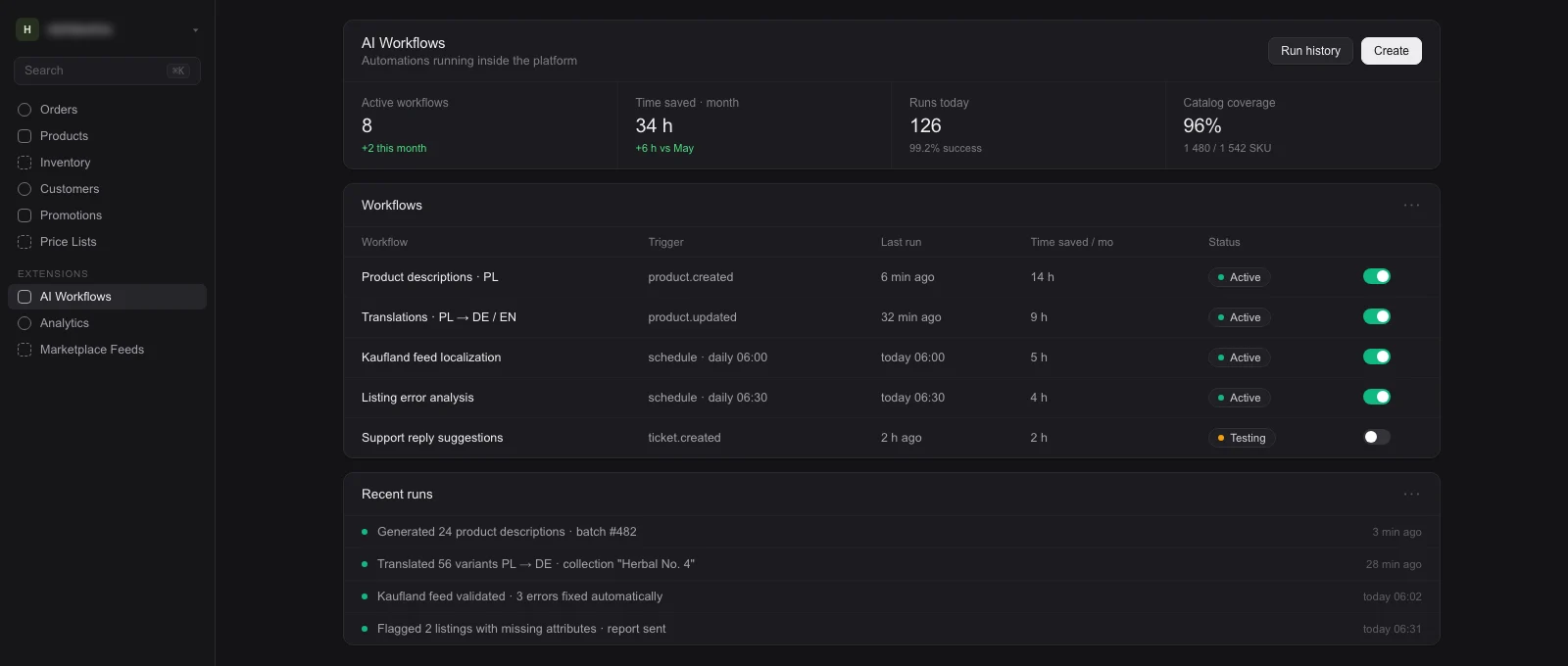
What the AI Automation stage covers
This is the layer that removes the most work from a store, and the least glamorous one to describe. The workflows we build most often:
- Product descriptions: generated within a set character range, with a dictionary of banned claims and required fields (AI product descriptions).
- Catalog translations: moving the assortment into another language along with units, sizing and category naming (catalog translations).
- Marketplace feeds: localisation and validation against the requirements of a specific channel, before the file goes live (feed automation). Selling on those channels is run by Amazonway, our sister brand, so the automation and the account sit on the same side.
- Listing error analysis: rejections grouped by cause with a proposed fix, instead of a raw error report (listing error analysis).
- Customer service: reply suggestions grounded in the real order status, approved by the team before they go out (AI customer service).
- Product data: attribute mapping and categorisation, which is how black, Black and BLK become one canonical value.
Every one of these shares the same anatomy: a trigger, rules written as numbers and dictionaries rather than adjectives, an explicit instruction for missing data, and a run history somebody can inspect. Without the fourth element you cannot tell whether the process works or whether nobody has complained yet.
We price this per workflow, from 6,000 PLN net, which is roughly 1,400 EUR at the NBP mid rate of 4.31 PLN per euro on 13 August 2026. That is a range, not a quote: the actual number comes out of a conversation about your catalog, your channels and how much time these tasks eat today. The full model is on the pricing page, the stage on AI Automation and in AI commerce automations.
Why a naive chat over your data does not work
The most common idea for an agent in an admin panel goes like this: take the store data, load it into a vector database and let the model search it. That approach works on documents and breaks on operational data.
The reason is simple. Orders, stock and prices are structured: they live in tables, they have relations and they change by the minute. Similarity search over text returns passages that sound close to the question, not the specific records the question was about.
The model then receives scraps instead of data and does one of two things: it says it does not know, or it guesses. The second is worse, because a guessed number reads exactly as convincingly as a true one.
What we build instead
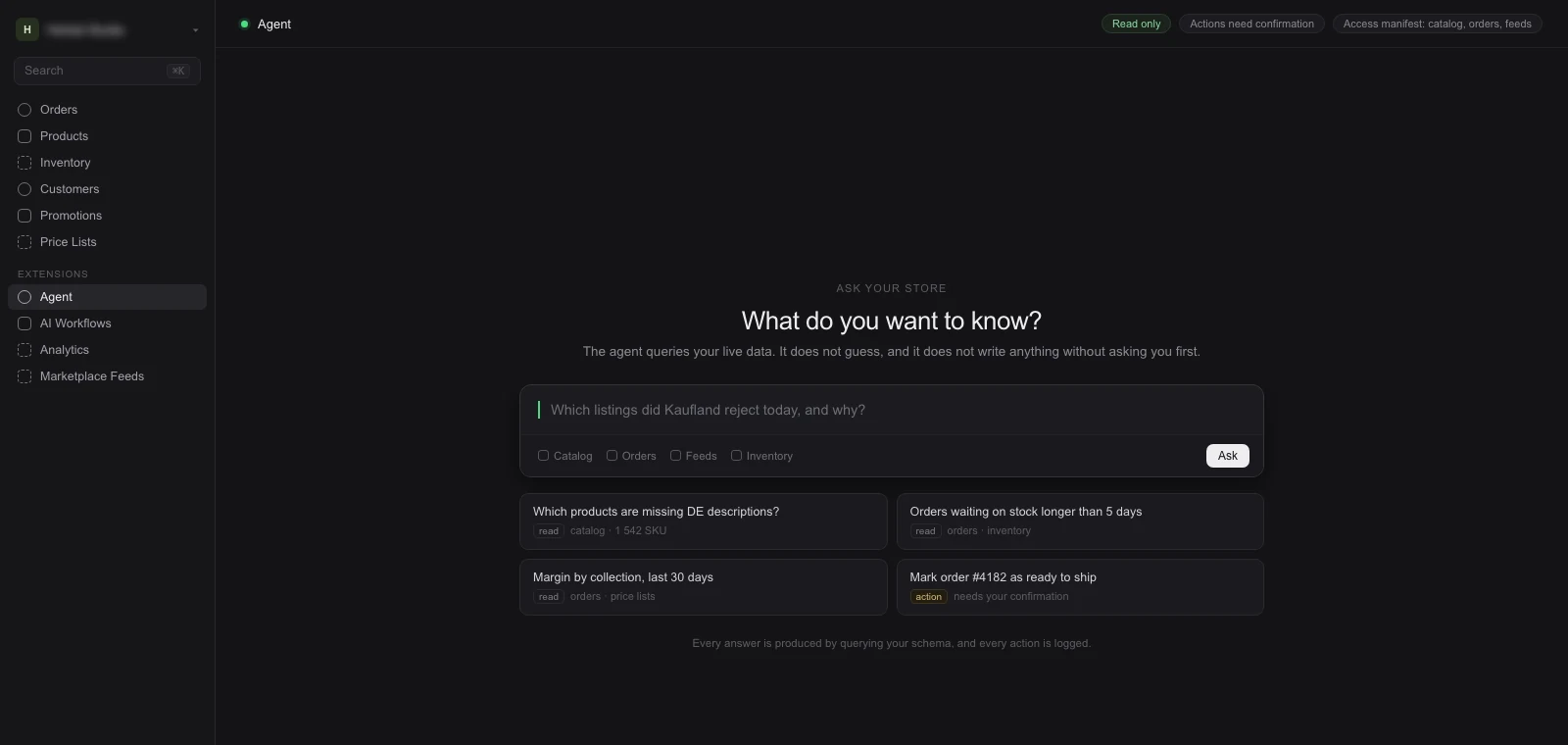
We build an agent that executes code rather than searching text. Asked why an order is on hold, the agent composes a query against the real database schema, runs it in a sandbox and answers from what actually came back.
The core in one sentence: the model does not know your data, it fetches it. So instead of stuffing records into a prompt, we hand the agent a map of the system (entities, key fields, statuses, available modules) and a tool for pulling those records on demand.
The consequence is practical rather than theoretical. The answer comes from this minute rather than the last indexing run, and it can be checked, because we surface the query the agent ran and what it based the answer on. It is the same discipline we described in AI-native is not vibe coding.
The permission model is the core, not an add-on
One question always comes up, and rightly so: what can this agent break. The answer does not lie in how politely we phrase the instruction, but in what the agent can reach at all. Hence two separate modes:
- Ask and read: the agent only reads. It answers questions about orders, stock, customers and sales, and it cannot change anything. This is where the large majority of everyday value sits.
- Act: a narrow, pre-approved list of actions, such as marking an order ready to ship or adding a note. Each one behind explicit human confirmation and an audit entry.
Financial and destructive actions, meaning refunds, price changes and anything touching personal data, stay in the second mode permanently. However well the agent handles everything else. This is not about trusting the model, it is about the cost of a single mistake.
The rule that settles everything else: guardrails live in code and configuration, not in the prompt. A line saying "do not change prices" in an instruction is a request. An executor with no write access at all is a guarantee.
For anyone letting AI into a panel full of orders, that difference is fundamental. A prompt can be bent by an unusual question or by text pasted in from outside, because a prompt is language and language gets interpreted. A permission layer cannot be talked around, because it does not read language at all.
On top of that sits hygiene that is not optional: the agent endpoint behind authentication only, every query scoped to the signed-in user and their role, separate staging and production environments, minimised personal data in responses, and an audit record for every call.
The access manifest: one artefact, three jobs
An access manifest is the configuration that states plainly which modules and fields the agent can see, which actions it may run, and which of those need approval. It is not a paragraph in a prompt but a file enforced in the tool layer. It does three jobs at once:
- A security control: what is not in the manifest does not exist. Widening the scope is a configuration change somebody signs off, not the result of a cleverly worded question.
- A compliance artefact: an auditor does not have to take your access policy on trust, they read it. Where personal data is involved, that is the difference between a claim and evidence.
- A customer argument: the team sees in writing what the AI touches and what it does not. That is usually what settles the question of whether an agent gets into the panel at all.
The manifest has one more benefit, less obvious than the others. It turns a general debate about AI risk into a concrete review of a list: this stays, this comes out, this needs confirmation. A conversation that otherwise runs for a month and ends nowhere takes an hour and ends in a decision.
It is also worth defusing one misunderstanding. The phrase about AI learning from your data sounds alarming, because it suggests training a model on customer records. Nothing of the sort happens in this architecture: the agent queries data on demand and returns a result, while log retention and legal basis are settled separately.
Where BEAM fits in
Workflows and agents are not a separate product sitting next to the platform. They are the A in BEAM, the AI Automation stage, which comes after the platform is built rather than instead of it.
That order is architectural, not commercial. An agent meant to answer questions about your orders needs access to the real data schema and to a backend of its own. A closed SaaS does not provide that access, and no plugin adds it.
Which is why a conversation about agents leads to a conversation about the platform, rather than the other way round. Not because we would rather sell a bigger project, but because the layer an agent walks across has to exist first and has to be under your control.
We build that foundation in the Engineering stage: data model, integrations, order flow and a backend we have full access to. In practice most often on Medusa, because it gives us real modules and real admin endpoints rather than a read-only API.
One place instead of seven tabs
The practical difference is not that the agent can answer. It is how much it can see. In a typical store the catalog sits in one admin, orders in another system, stock in the ERP, contract prices in a spreadsheet and feeds in a marketing tool. No assistant joins those worlds, because there is no single way in.
BEAM is that way in. The platform we implement holds catalog, orders, stock, price lists, sales channels and automations in one backend the agent has described access to. That is why a question like “which products from last week still have no German description and were rejected on yesterday’s feed” stands any chance of an answer.
Then there is a layer few people associate with AI: the non-technical context. How the company is structured and who decides what. What was agreed in the Blueprint. Why a particular option was rejected. The plan for the next market. That knowledge usually lives in people’s heads and in email threads, and if an agent is to be useful, it has to be written where the agent can reach it.
So decisions land in the project repository next to the code, not in a slide deck. It is the same material the team reads before the next change, and the same material the agent draws on. A new hire and a new agent onboard from one source.
The practical consequence: the more of the process lives on one platform, the fewer questions end in “I cannot see that”. Data scattered across seven tools is not an AI problem. It is an architecture problem that AI simply makes visible.
A module, not a one-off feature
We build the agent layer as a module that carries over to the next client. The module itself, the tools, the permission modes and the test harness stay the same. What differs per client is the overlay: a map of their schema, the access manifest, and the list of first questions the agent has to answer without slipping.
There is a second effect you only notice after a year. When you add another capability to the platform (live chat, returns, reviews) and it is a module in the same backend, the agent queries it through the same layer. No separate AI integration each time.
Straight about numbers: we publish no success rates and no averaged savings here. An arithmetic from one catalog does not transfer to another, and the only calculation worth anything is the one done on your data and on the hours these tasks consume today.
When an agent makes no sense
Now the honest limit, without which this piece would be a leaflet. With a small catalog and low volume, automation never pays back, because building and maintaining the rules costs more than the time those rules remove.
Three hundred products that change once a quarter are faster to describe by hand than to build a process for. A dozen orders a day are handled by one person with no agent at all, and the answer to why an order is on hold is ten seconds away in the panel.
So we hold to a single qualification rule: if a workflow does not save time, improve quality or support sales, we do not build it. We say that even when a client arrives with a budget for AI already approved and a specific idea in hand.
Three signals that the threshold has in fact been crossed:
- Repetition: the same task returns every week, in the same shape, across several hundred items at once.
- Multiple channels: the same data has to appear in several places, each with its own set of requirements and limits.
- Cost of error: a mistake in product data goes straight into a sales channel, so quality control has to be a process anyway, not one person remembering.
If none of the three applies, the better investment is putting the product data in order. It is a precondition for any automation regardless, and it does the same job for visibility in agentic commerce, where buyers increasingly send a machine to find the offer for them.
An AI agent running a store does not look like the demo video. It looks like a process that on Monday morning closes out descriptions for 200 new products, groups 30 rejected feed items by cause and drafts the parcel reply, leaving a person the decisions that should not be handed to a machine.
The rest is the engineering that decides whether this is a tool or a liability: data fetched rather than guessed, two permission modes, an access manifest, and guardrails written into code instead of a prompt. That is how we build it, and how we would suggest approaching it, whoever ends up building yours.
FAQ
What is the difference between an AI workflow and an AI agent?
A workflow is fired by an event or a schedule, does one job within a closed scope and leaves a run history. An agent is started by a human question and decides which data to reach for, within the permissions it was granted. The large majority of everyday value sits in workflows and in read access, not in write actions.
Can an AI agent break something in my store?
In ask-and-read mode it cannot, because it has no write access at all: it can only read. Anything that changes data runs in a separate mode, on a narrow pre-approved list, each action behind explicit human confirmation and an audit entry. Refunds, price changes and operations on personal data stay behind confirmation permanently.
What about data security and GDPR?
The agent endpoint is available only behind authentication, every query is scoped to the signed-in user and their role, and the executed code runs in a sandbox. Add an audit record for every call, minimised personal data in responses, separate staging and production environments and an agreed log retention policy. The agent queries data on demand; it does not train a model on it.
Why not just connect a model to the store database with semantic search?
Because operational data is structured, not textual. Similarity search returns passages that sound like the question rather than the specific records, so the model either says it does not know or guesses. What works is an agent that composes a query against the real schema, runs it, and answers from what came back.
How much does an AI workflow cost?
We price per workflow, from 6,000 PLN net, roughly 1,400 EUR at the NBP mid rate of 4.31 PLN per euro on 13 August 2026. That is a range rather than a quote: the number depends on the catalog, the channels and how much time the task consumes today. The full model is on the pricing page.
Can this be done on a closed SaaS platform?
Partly. Individual workflows built on exports and a public API are usually feasible. An agent querying operational data needs access to the real schema and to a backend of its own, and a closed platform does not provide either. That is why this layer sits after the Engineering stage on our side.
Journal
Co-founder of Seedlight · eCommerce platforms, AI, SEO and GEO
Newsletter
The Journal, straight to your inbox
New articles and lessons from real builds, every now and then. No spam, unsubscribe with one click.